Side by side
Both versions next to each other, on the same frame. The most readable mode when a cut has changed pace or shots.
“Side by side” mode
Compare two grades with a wipe, comment on a whole passage rather than a single frame, check a 9:16 crop before export, zoom into a detail with the loupe. The tools that are missing everywhere else.
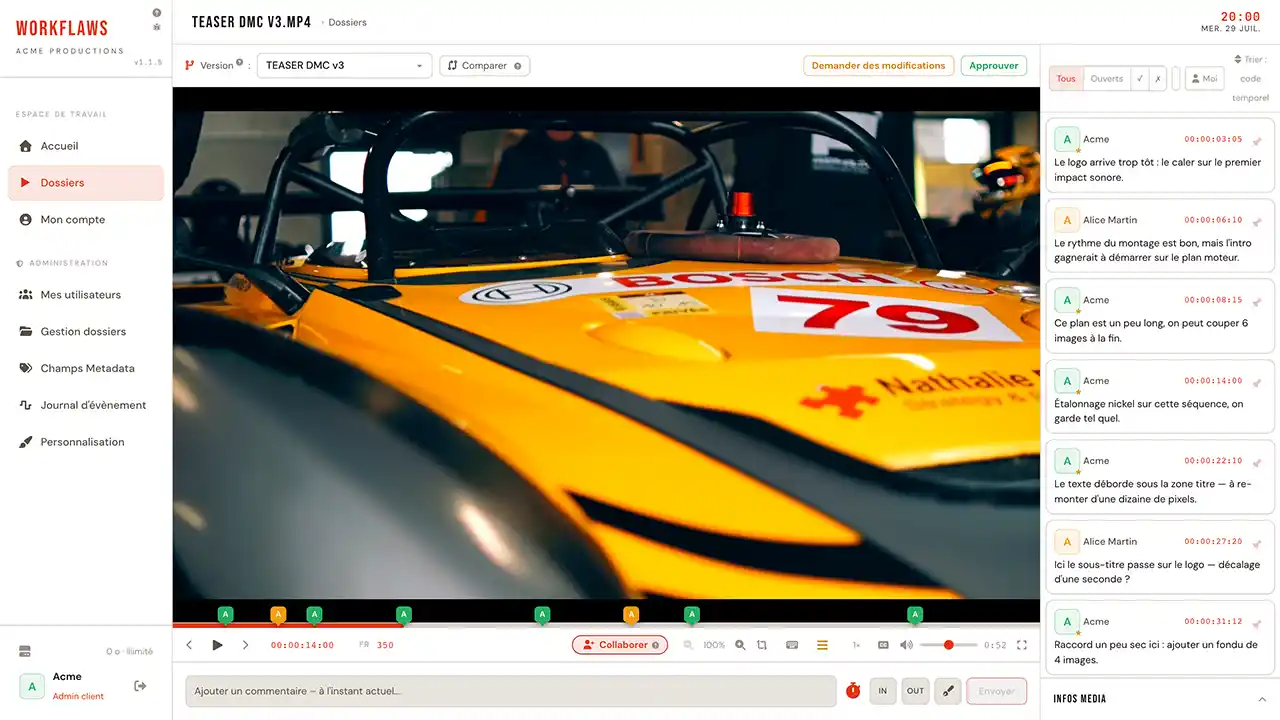
Group two cuts as versions, click Compare: a single transport drives both, frame for frame. Three ways to set them against each other, depending on what you are after.
Both versions next to each other, on the same frame. The most readable mode when a cut has changed pace or shots.
“Side by side” modeBoth versions stacked, with a sliding wipe revealing one under the other. Unbeatable for judging a grade or VFX work in the very same spot of the frame.
“Wipe” mode · draggable handleOne image, alternating between A and B. The eye catches the slightest shift as a flicker, and the sound follows whichever version is showing, giving you an audible A/B too.
“Flip” mode · A ⇄ BWhen v2 doesn't begin on the same frame as v1, an offset control shifts version B by one second or by 40 ms, one frame at 25 fps. Version A stays the reference.
By default both soundtracks are muted: two mixes at once is unlistenable. You pick the audible version, or let the sound follow the flip.
Every note remains attached to the cut it was left on. A filter shows A's markers, B's, or both, and playback can loop over just the compared stretch.
The comparison exists on the sound side too, with a seamless crossfade between two mixes: see audio comparison and blind listening.
A useful note points at a precise spot. These four tools are there for that: to frame the remark in time, in the image, and in the delivery format.
Set an in point and an out point: the comment covers a whole duration rather than a single frame. “This passage runs long” finally points at the passage. The range shows on the transport bar, and a drawing that goes with it stays visible from start to end.
IN / OUT · the comment spans the rangeOverlay the broadcast safe areas (action and title) plus centred crop marks for 16:9, 1:1 and 9:16. Enough to check that a subtitle won't fall outside the frame, or that a shot will hold up vertically, before export.
safe areas · 16:9 · 1:1 · 9:16Zoom into the image with the wheel, pan by dragging, snap back with one key. The loupe follows the cursor and magnifies whatever it passes over, to read burnt-in text or judge digital noise without leaving playback.
+ / − / 0 · the loupe follows the cursorThe timecode reads h:m:s:frame and can be typed into, to jump wherever you want. Arrow keys step one frame at a time, the in/out loop isolates a passage, and playback speed slows down to pick a movement apart.
00:01:24:12 · loop i / oSeven colours, undo and redo, playback pausing on its own the moment you pick up the pen. The stroke is saved and tied to its frame, and shared live during a review session.
z / y · undo, redoLoad several subtitle tracks to check them in context. And send every timestamped comment back to your edit: Premiere markers or CSV, with no retyping.
→ Premiere markers · CSVThis is the heart of Workflaws. Open a live review session: whoever joins sees exactly what you see. No more “go to 1:24”: they are already there.
During the session, playback, seeking and annotations are synchronised for everyone taking part. An indicator shows who is driving at any moment.
An open session makes the media glow green on your reviewers' home screen, and they get an email too. One click and they are with you; the same button leaves without closing the media.
A public link opens the media without signing up: the client watches and comments as a guest. Links stay revocable, and existing accounts keep their usual permissions.
What is counted are clients — one access and one folder each. Resolution steps up just once.
Enough to judge an edit, a rhythm, an overall grade. Up to 100 GB of media storage.
To sign off a fine grade or texture work at delivery resolution — the one cameras shoot. From 500 GB to 2 TB.
Full plan details on the pricing page. Need more storage? Write to us.
Pick a plan, your workspace is created automatically and your login details arrive by email.