The versions are hidden
There is no telling which one is playing. You move to the next or vote “I prefer this one”, from the keyboard if you'd rather keep your eyes shut. The verdict only appears at the end.
space: next · enter: I prefer
Blind listening that matches levels to remove the volume bias, broadcast metering to standard, a spectrogram and a mix comparator. A studio's analysis tools, in the browser.
The file name, the hours poured into it, a slightly louder level: all of it weighs on a listening judgement. Blind listening takes those crutches away and leaves only the sound.
There is no telling which one is playing. You move to the next or vote “I prefer this one”, from the keyboard if you'd rather keep your eyes shut. The verdict only appears at the end.
space: next · enter: I preferThe louder version always sounds better: the oldest bias in the trade. Loudness matching lines the versions up before you listen, so the comparison is about the mix, not the gain.
“Loudness matching” optionThe same version can come round twice in a row. That is deliberate: with two versions strictly alternating, you'd only have to count the rounds to tell them apart, and blind would no longer be blind.
no forced alternationCompare the whole track, or narrow it to a loop: the chorus, eight bars, the drums coming in. Two masters usually part ways on one precise passage.
whole track · loop in → outAt the end, the preferred version is revealed along with the count: how many times chosen out of how many rounds, listening time, and whether levels were matched or left as they were.
“preferred · 4/6 picks, levels matched”The verdict is saved as a comment on the winning version. Six months later, you know which master was picked, on what grounds, and by how many votes.
“Save the verdict”Metering doesn't replace listening: it settles it when listening hesitates, and it stops you delivering a file that's out of spec.
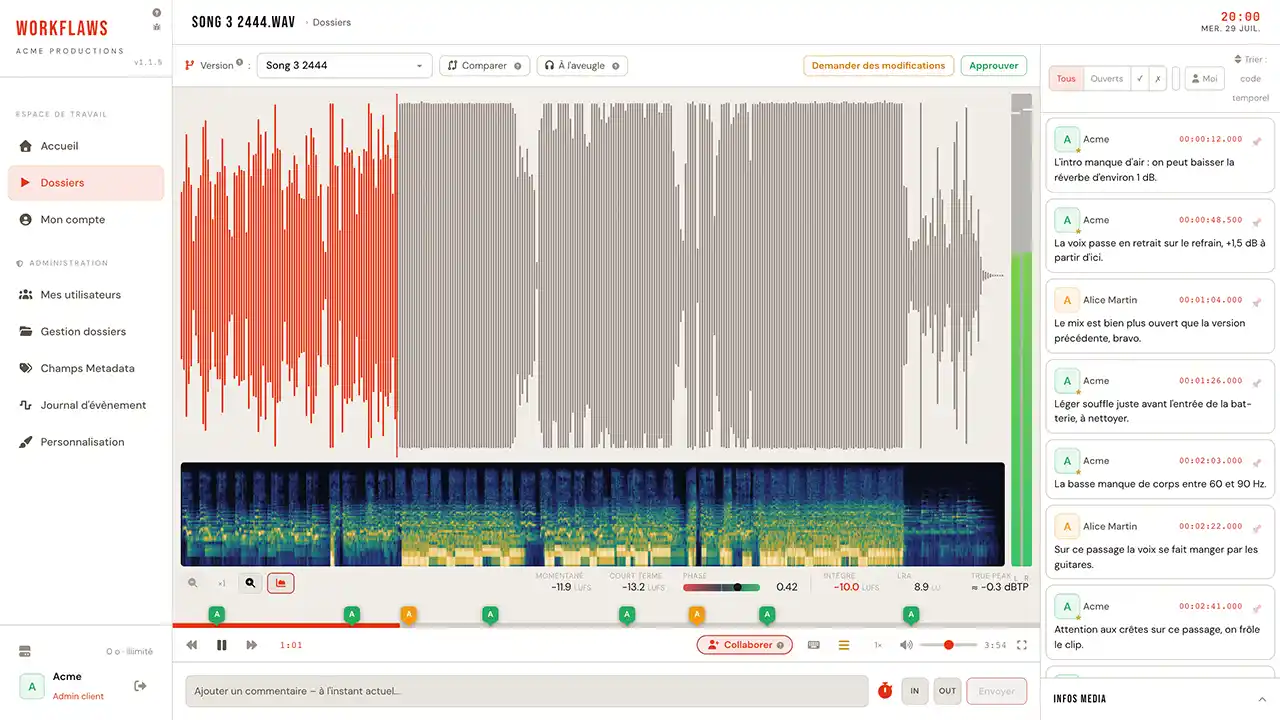
The dynamics of the track at a glance. Click to move playback, zoom down to the detail, and clipping zones stand out in red: a file that saturates can be seen before it is heard.
clipping flagged in redHow frequencies spread over time, under the waveform: lows at the bottom, highs at the top, intensity by colour. This is where you spot a steady hiss, a resonance that rings on, or a hole in the spectrum.
time × frequency × intensityLeft and right levels in real time during playback, with peak hold. Enough to catch an imbalance between channels or a lone peak that slips past the ear.
peaks heldIntegrated LUFS across the whole programme per BS.1770, plus momentary (400 ms) and short-term (3 s) running live at the playhead. The delivery target gets checked before delivery, not after.
integrated · momentary 400 ms · short-term 3 sLRA measures the gap between the quiet and the loud passages, the tell-tale of an over-squashed mix. True peak catches the overshoots that ordinary sample peaks let through after conversion.
LRA (EBU) · true peak in dBTPThe phase indicator reveals a stereo image that will collapse in mono: on a counter speaker, a story, a radio broadcast. The kind of problem you never discover on headphones.
mono compatibilityFine analysis (sharp zoom, LUFS, spectrogram) is computed in your browser; it switches off beyond 20 minutes of programme to spare the machine's memory.
Group two versions and compare them in playback: A and B run in sync, and the slider crossfades one into the other without the slightest gap. The difference is heard on the same passage, not on a memory.
Switching from one mix to the other neither cuts the sound nor sends you back to the start. You stay on the bar you were judging.
Set an in and an out point, let the eight troublesome bars run, and go back and forth between versions until you can call it.
Notes stay attached to the mix they were left on, and the version selector moves between them without mixing them up.
The same comparator works on the image, with a sliding wipe and an offset adjustable to the frame: see video version comparison.
This is the heart of Workflaws. Open a live listening session: whoever joins hears exactly what you hear, at the same point in the track.
During the session, playback, pauses and seeking are shared by everyone taking part. You comment on a passage without having to say where it is.
An open session makes the media glow on your reviewers' home screen, and they are emailed too. One click to come in, the same button to step out without closing the track.
A public link opens the track without signing up: the artist or client listens and comments as a guest. Links stay revocable at any time.
What is counted are clients — one access and one folder each. Playback fidelity steps up just once.
Cymbals and reverb tails stay legible: enough to judge an arrangement, a structure, an overall level.
Exactly what you delivered, with no re-encoding. Essential to sign off a master.
Full plan details on the pricing page. Need more storage? Write to us.
Pick a plan, your workspace is created automatically and your login details arrive by email.